01 — Why Rebuild
The Python pipeline worked. The Python requirement didn't.
The original PDP pipeline processed 117 styles in 40 minutes for $4.59. The logic was sound. But it required a Windows machine with Python installed, a virtual environment, a .env file with API keys, and someone comfortable running a script. That's a one-person operation.
The goal with the n8n rebuild was to remove every local dependency. If the workflow lives in the cloud — triggered by a Drive upload, configured from a spreadsheet, and delivering results by email — then anyone on the team can use it from anywhere. The intelligence stays the same. The operational surface shrinks to: upload photos, check email.
Python Version — Constraints
- Requires Windows machine with Python
- Manual setup: venv, .env, dependencies
- Must be present to start and monitor
- Output is a local Excel file
- Changing models or prompts requires editing code
- One operator, one machine
n8n Version — What Changed
- No local machine required
- Credentials stored once in n8n, never touched again
- Trigger fires automatically on Drive upload
- CSV delivered via Drive link in email
- Models and prompts configurable from Google Sheets
- Available to any authorized team member
02 — How It Works
Fourteen nodes. One folder drop to finished CSV.
The workflow is a linear-with-branches pipeline. It starts from a Drive trigger, fans out to process each photo pair in sequence, applies a QA feedback loop on every result, then aggregates and delivers everything at the end.
01
Drive Trigger + File CollectionGoogle Drive watches a designated folder. When a new photo arrives, the workflow waits 10 seconds (collecting the pair), then lists all files in the folder and sorts them alphabetically — the same pairing logic as the Python version.
02
Config Load from Google SheetsReads two sheets: skill_config (model names, prompts, delay settings, max QA retries) and qa_examples (failure patterns with bad/good examples). These are assembled into a runtime config object passed to every subsequent node — change a model or tweak the QA prompt without touching the workflow.
03
Pair Loop — Photo Download & EncodeFor each pair, both photos are downloaded from Drive in parallel and base64-encoded for API submission. A merge node combines them into a single data object before any AI calls are made.
04
Label Extraction with Auto-SwapClaude Haiku reads the first photo looking for label data (BGRP code, brand, style name, ecom style number, ecom color number, gender/age). If the response comes back empty — meaning the label photo was shot second — the workflow automatically retries with the other image and reassigns which photo is the label and which is the product shot.
05
Customer Friendly Name LogicGender and age terms from the label are mapped to standardized retail prefixes (Men's, Women's, Boys', Girls', Infant (0–4), Toddler (4.5–10), Little Kid (10.5–3), Big Kid (3.5–7)). This prefix is injected directly into the PDP system prompt as a formatting constraint.
06
PDP GenerationClaude Sonnet receives the product photo, label data, and the governing skill prompt — assembled from the Google Sheets config. It returns a JSON object: customer_friendly_name, product_description, features array, and applicable_features. The model and max_tokens are configurable without touching the workflow.
07
QA Check + Retry LoopClaude Haiku evaluates the generated PDP against the QA rubric (loaded from the qa_examples sheet). If it fails and retries remain, the workflow sends the rejected output back to Claude Sonnet with the specific failure reasons and requests a correction. This loop runs up to max_qa_retries times before forcing acceptance and flagging the row.
08
Collect, Deduplicate, DeliverAfter the loop, all results are deduplicated by ecom style number — multiple colorways collapse into one row with all color numbers listed. A CSV is built and uploaded to Drive, then an email is sent with the filename, counts (OK / errors), and a direct link to the file.
Workflow Diagram
The full pipeline, node by node
Every node visible — from the Drive trigger on the left to the email delivery on the right. The QA retry branch is in the top-right corner. The output path (CSV build → Drive upload → email) runs along the bottom.
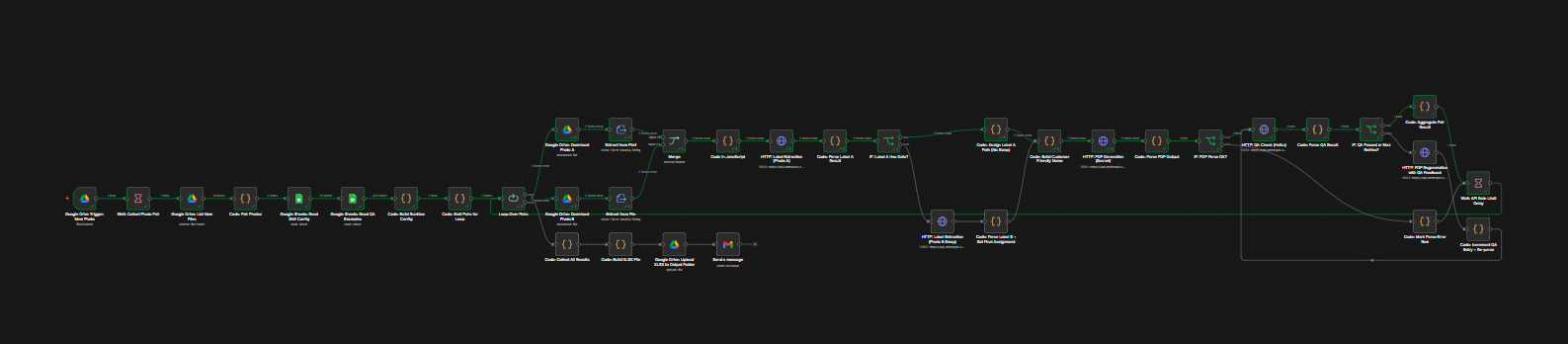
Workflow diagram
Add assets/n8n-workflow.png to show the canvas screenshot here
n8n workflow canvas — Footwear PDP Generator (Fixed)
03 — The Config System
Everything configurable. Nothing hardcoded.
The workflow reads all operational parameters from a Google Sheets document at runtime. Changing the AI model, updating the skill prompt, adjusting the QA rubric, or tuning the retry count requires no access to the n8n workflow editor — just editing a spreadsheet.
label_model
The Claude model used for label extraction and QA. Default: claude-haiku-4-5-20251001. Swap to a faster or cheaper model here.
pdp_model
The Claude model used for PDP generation and QA-driven regeneration. Default: claude-sonnet-4-6. Controls output quality vs. cost tradeoff.
qa_model
The model used for QA evaluation passes. Can be set independently to use a faster model for checking than for generating.
skill_prompt
The full SKILL.md governing prompt, stored as a single cell value. Updated here, reflected in every run immediately — no workflow edit required.
qa_prompt
The QA system prompt template. Supports two placeholders — {{SKILL_PROMPT}} and {{QA_EXAMPLES}} — which are filled at runtime from the other config values.
max_qa_retries
How many times to attempt a QA-driven regeneration before forcing acceptance. Default: 2. Raise for higher quality tolerance; lower to reduce API cost.
api_delay_ms
Milliseconds to wait between pairs during the loop. Controls throughput vs. API rate limit headroom.
The qa_examples sheet provides structured failure patterns — each row has a rule ID, failure description, a bad example, a good example, and the affected field. These are assembled into a readable block that gets injected into the QA system prompt, so the model knows exactly what it's grading against.
04 — QA Feedback Loop
Reject, explain, regenerate. Up to n times.
The QA loop is the part that most distinguishes this workflow from a simple generate-and-ship pipeline. Every piece of generated copy is evaluated against the rubric before it touches the output file.
PDP Generation
Claude Sonnet writes customer_friendly_name, description, features, applicable_features
Parse & Validate
Extract JSON. If parse fails → mark error row, skip QA, move on
QA Check (Haiku)
Evaluate against rubric. Returns: passed (bool), score, failures[], corrected_fields{}
QA Passed or Max Retries Reached
Accept output. Status: OK or QA_FORCED_ACCEPT. Add to results.
QA Failed — Retries Remaining
Send rejected output + failure list back to Sonnet. Increment retry counter. Re-check.
When QA fails, the regeneration prompt is explicit: it shows the model its previous output, lists the numbered failures, and instructs it to fix each one. QA results can also include corrected_fields — partial corrections the QA model can apply directly without a full regeneration pass. Rows that exhaust retries are accepted but flagged as QA_FORCED_ACCEPT in the output so they can be reviewed manually.
node HTTP: QA Check (Haiku)
eval passed: false | score: 6 | failures: ["CFN missing gender prefix", "Color word 'black' in description"]
node HTTP: PDP Regeneration with QA Feedback
eval passed: true | score: 10 | qa_retry_count: 1
node Code: Aggregate Pair Result → status: OK
05 — Design Decisions
Why it's built the way it is
Alphabetical pairing, not timestamp pairing
The Python version paired photos by iOS timestamp. n8n's workflow context doesn't expose file metadata the same way, so pairing is done by filename sort order — which works reliably as long as photos are named in a consistent pair pattern. The auto-swap detection handles the case where the pair order is reversed regardless of naming.
Google Sheets as the control plane
The skill prompt and QA rubric are the most frequently updated parts of any governed pipeline. Storing them in a spreadsheet means the person who maintains the writing standards (who is not necessarily a developer) can update the model's behavior directly. It also creates an audit trail: every version of the prompt is a cell edit with a timestamp.
Haiku for label extraction and QA, Sonnet for PDP generation
Label extraction is a structured data extraction task — low creativity, high precision. QA evaluation is a classification task. Both are well within Haiku's capability at significantly lower cost. Sonnet is reserved for the task that actually requires language generation quality: the product description and feature bullets.
CSV output via Drive link in email
The Python pipeline wrote an Excel file to the local machine. The n8n version builds a CSV, uploads it to Drive, and emails a direct link. The result is accessible from any device, shareable without file transfer, and stored in the same ecosystem as the input photos.
The Python version proved the logic. The n8n version proves the logic doesn't need you to be there.
06 — Stack
What it's built on
n8n
Google Drive API
Google Sheets API
Gmail API
Anthropic Claude Haiku
Anthropic Claude Sonnet
Claude Vision API
Base64 image encoding
SKILL.md governance
QA rubric system
Style deduplication
CSV generation
07 — What's Next
Already scoped for v2
Shopify or Oracle Fusion write-back — auto-populate the product record directly instead of delivering a CSV for manual import
Per-pair status webhook — real-time Slack or Teams notification as each pair completes, not just on final delivery
Multi-folder routing — different Drive folders mapped to different brand configs, so Shoe Carnival and Shoe Station run the same workflow with different SKILL.md prompts
Error escalation — QA_FORCED_ACCEPT rows trigger a separate notification so they're reviewed before the file is used in production
Prompt version tracking — log which version of the skill_prompt and qa_prompt was active during each run for full audit trail